The A Team

Contd from the previous post..

So how do we succeed?
Lock up Enemy #1 - Accidental Complexity

Empower teams to choose

All projects / teams are not the same. Different needs, different tools. This may be difficult in BigCo especially if the tools have already been bought. But make some noise - stand up for your tools, the "users" need to channel some feedback upstream to the "purchasers".
  • Explore options instead of resigning to the golden hammer. Prefer tools that don't get in your way. Ones that don't require you to learn yet another proprietary language. Ability to write extensions in your team's native language is a +. This also opens avenues for developers to assist with automation work, if required.
  • Use existing tools instead of writing your own - they're likely to be functional, tried and tested
  • Avoid putting all eggs in one basket. Keep tools/test-runners swappable by defining layers. To migrate to a different test runner, you should only need to migrate your thin tests layer which calls into an automation layer below it, which does most of the heavy lifting. More on this soon..
Collaboration
forms a reinforcing loop against Silos/Specialists. Increasing collaboration decreases opportunities for specialization, which in turn facilitates more collaboration. Of course, the reverse is also true - Silos can finish off collaboration. Only one shall survive, you just have to choose.

Outside-in / Test-first + Wishful Thinking
If you've tried the XP Practice of TDD, you'd know the liberating feeling of letting the unit tests drive the design of the production code. You fix the end-goal, you make it work, make it clean and repeat.
Starting with the test prevents any bias (arising from implementation details, existing tools at your disposal, etc.)

ATDD is the corresponding practice at the system level. However it is not an easy practice to quickly latch on to. So work towards it in baby steps
For starters, concentrate on a DONE definition + writing tests first (before implementation) from the users' perspective on a piece of paper. Make sure everyone has the same idea of DONE before you start the iteration.
As the team matures, you can even move up to ATDP (from the BDD world) where you write test before or during iteration planning & use them for estimation.


WHAT over HOW
Ensures that the test is at the right level of abstraction (the ol' forest over trees adage). It makes the tests shorter and readable. It also works beautifully to bring out the intent (as opposed to the implementation) of the test.
Specify the bare minimum ; things that are relevant to the test at hand.. all other details need to be out of sight.

Stable DSL for testing
You employ wishful thinking to imagine the ideal interface you'd like the system to expose for testing. Since the tests are another client to the system, they can also drive beneficial design changes. The tests stand-in for real users, so if the system is difficult to consume for the tests it follows that it might be for the users too. You could start with a plain C# interface to begin with and then work your way up to a custom DSL. It
  • abstracts away incidental details like the GUI, underlying technology and other implementation details.
  • abstracts away the tools used for automation from the tests.
  • decouples the people interested in writing tests from the automation personnel. This allows both to play to their strengths and offers the best of both worlds. e.g. the testers could define the automation interface changes for the sprint and the developers could implement them with production-code like quality.
  • makes it easy to write new tests with relatively little boot-up time. Writing a test then is just combining the reusable building blocks offered by the test DSL. The tests layer is a good training ground for new hires.
Imagine (wishful) a robot that will operate the system for you and think of the commands that you'd issue to the robot. The set of commands are your starting point.
e.g. robot.DoX(params) or robot.GetY()

Programming Skills
Automation is programming. Without good programming techniques and discipline, sustainable pace would be difficult.
This means you need to raise the bar for automation personnel and/or leverage devs. If the team lacks the skill-set required, take countermeasures... Training, get some experts onboard, etc. The average skill level of the team can also be increased by frequent pairing.


Refactoring
Your #1 weapon against complexity. Beck's 4 rules for simple design, the techniques from the Refactoring book (Martin Fowler) + the SOLID principles are a must-read. Top that off with an introductory text on programming (e.g. Clean Code - Robert Martin) and you should be good to go.

Good Naming & Discoverable Design
Taking the time to pick good names goes a long long way. Good names make it easy to find things, facilitate understanding, help zone in on a specific area to change & reduce duplication
This also helps in being able to discover the design / API using just the IDE (learn by intellisense) and programmer intuition. Choose names that are likely to be searched. Operate by the principle of least surprise (code that works as expected the first time around); Avoid hidden side-effects. Document and use team conventions to preserve consistency.

Communicate Intent / Distill the essence
This takes WhatOverHow to the next level. Explaining Why e.g. by extracting another "coarse" method to move up one level OR differentiating sets of inputs by using explanatory names. This reduces the test further to the essence - where the tests turn into readable system documentation... the kind that never gets out of date.

Learning Curve
Refactoring well and often keeps accidental complexity down to manageable levels. The supporting cast of Pairing, a discoverable design, intention-revealing code and a good testing DSL make it easy for new team members to learn the ropes.
This inhibits cargo-cult behavior and the changes made are deliberate/intentional rather than hopeful. Another source of complexity wanes.

Test Maintenance - the last frontier
Test Maintenance like complexity can be minimized not eliminated. As complexity decreases, maintenance effort reduces too.
The testDSL makes it possible to write-and-test the blocks once & use anywhere. Simple designs (no duplication, intention-revealing code, minimal classes) make maintenance much easier.

Transitively, the cost of automation goes down as well.

Let's refactor our diagram to remove the accidental nodes and edges and things get clearer now. Refactoring code is even more rewarding.

Towards better acceptance test automation...

This started out as a sketch of a Causal Loop Diagram (CLD) for bad acceptance test suites... and then it got away from me :) The black arrows indicate "+ve links" e.g. Duplication and Complexity increase/decrease together. The blue arrows ending in dots indicate "-ve links" e.g. Refactoring and Duplication work against each other. Increase in Refactoring causes decrease in duplication.
Click on it to be able to zoom in.


Automated tests != Free Lunch

Disclaimer: I'm a proponent of XP and truly believe it has made me a much better programmer. This post just aims to let readers see through the fog-of-agile caused due to data-transfer loss as it passes from person to person. Please do not misinterpret this as an anti-agile rant. I'm just saying it doesn't work out always unless you're willing to put in the effort to make the change.

Legend
What you hear… (good) the Promised Land
  • What was left unsaid (bad.. or downright ugly)

You have an automated regression-safety net to make future changes. Make a change, Push a button and you will know if you broke anything. CI can provide near instant-feedback. Better confidence.
  • You have 2-3X the code to maintain. If you have people who don’t care/are too busy/ not passionate about code quality and writing good tests, the tests are the first to put a chokehold on your productivity. Bad tests are as good as (or possibly worse than) having no tests. You could see yourself in a situation where a section of your team is permanently siphoned to keeping the build/tests green. This turns into a daily bottleneck. Tests need to be self-checking, thorough, readable, professionally written, independent, repeatable, concise and FAST. All this takes effort!

Documentation - the tests can be "live specs" of the application - They never get out of date like documentation.
  • It takes a significant level of discipline and skill to write readable spec-tests. An essential skill :to see the What and Why without getting entangled in the How. Most teams get this wrong... without noticing it.
  • Sidenote: The practice of ignoring failing tests is criminal (but usually not punished accordingly) and can lead to misleading specs.


Quality & Productivity: Leads to high-quality production code. Fewer Bugs. More features added / unit time (because you spend less time in debugging and manual testing)

  • IF you let the tests drive/shape your design (ATDD and TDD). Client-first design is an unstated requirement.
  • The quality of the code is usually a direct reflection of the people writing it. This means you need craftsmen (> 30-50% of a team) and NOT armies of cargo-cult programmers.
  • If you're using automated tests exclusively for regression (or getting your 'agile badge'), you'll slowly grind to a halt. Writing tests for "untestable blobs implemented from a non-negotiable handed-down paper design" is frustrating. People can be stuck on “how do I test this?” – Usually leads to silent trade-offs & non-thorough test which will let in bugs and put you in the net negative w.r.t. productivity.


Less rework/thrashing: The dialogue / conversation (that you have with the customer to come up with the acceptance tests) makes it highly likely that you’re building the right thing..
  • Assumes that the customers want to collaborate with the developers and testers. This is not often true.. Real users are sometimes real hard-to-find. Even if you manage to snag one of them, you can only procure a small slice of their time. Real users rarely want to write tests.

  • If the customers give a “vision” and delegate the responsibility of mapping them to executable specs to the technical team (or worse the QA/testers), you still run the risk of “This is not what I asked for” late in the game. Regular demos may help shorten the feedback time.. but you may still waste an iteration.The magic potion here is collaboration and conversation.. the tests are just a beneficial byproduct.


Simple: Red-Green-Refactor. How hard can that be?
  • Sounds simple.. but is deceptive. True OO is a minority sport. Refactoring is a skill that you need to work on. Off the job practice is mandatory.
    You may need to "hire" a good coach for an extended period (I'd say 6 months-1 release) to get the team rolling. Spot trainings/Just-in-time learning won't work for most teams.

Enterprise Library Logging vs Log4Net for a rolling file log : jumpstart and a showdown!

I was looking for a rolling file log and couldn't make my mind between the two. So I embarked on a small quest to see which one is easier to learn and work with.

Flash Cards Kata and the transformation priority premise

I began the new year by resolving to complete the PCL (Peter Siebel's) book. Around the same time, another interesting post by Uncle Bob appeared on the WWW. A discussion on the TDD yahoogroups spurred me to try a Kata - two-sided Flash Cards.

Looked easy enough to test my new-found Lisp skills. Although I was not consciously choosing the next test / step based on the transformation priority, I was curious to know if I had been doing it all along without knowing it.

This innocuous looking kata had me stuck initially - what is the right first step? Trash-canned the first couple of attempts. The third attempt was slow but I succeeded. I did it again in C# just to see if the language had any bearing on my method. This time I was faster because I was familiar with the trail now.

  1. I am not wiser with regard to the priority premise - I found I used a bunch of transformations that were not part (bold) of the original list (shown in blue below). As a result, their priorities are unknown. This was the proverbial rain on my parade.
  2. Also in the C# variant, I found a couple of tests where I needed multiple transformations to get to the next green & I could not figure out a smaller test.
Note: Check the "speaker notes" in case things get dense especially with the Lisp one. Use the menu button at the bottom-right to get to the presentation link

Attempt#1 Flash Cards Kata in Lisp


TEST User should be asked a question
  • {} => statement
TEST A right ans should be confirmed
  • P5 (statement->statements) adding more unconditional statements.
TEST A wrong ans should be corrected
  • P6 (unconditional->if) splitting the execution path
TEST Diff card and a right ans
  • P4 (constant->scalar) replacing a constant with a variable or an argument
TEST Diff card and a wrong ans
  • constant => expr
TEST Multiple cards
  • {} => loop (statement)
TEST Answers are case insensitive
  • exprX => exprY
TEST Answers can have leading/trailing whitespace
  • value => expr
Attempt#2 Flash Cards Kata in C#
TEST User is asked the question
  • P2 nil -> constant
TEST User is asked another question (triangulate)
  • {} => statement *** Play()
  • constant => field *** LastQuestionAsked
  • void => statement *** Ask() - is there a smaller step here?
TEST A correct ans is confirmed
  • P2 nil -> constant
TEST A wrong ans is corrected
  • P5 (unconditional->if) splitting the execution path *** Play()
  • P4 (statement->statements) adding more unconditional statements
  • nil => expr *** User.WhoAnswers
  • field assignment *** User.ctor
  • constant => field *** User.LastConfirmationReceived
  • void => statement *** User.Notify
TEST A diff question and a right answer
  • P4 constant => scalar arg
TEST A diff question and a wrong ans
  • constant => expression
TEST Two cards
  • {} => statements
TEST Multiple cards
  • {} => loop
  • P4 (statement->statements) adding more unconditional statements *** User
  • field assignment *** User.ctor
TEST Case insensitive answers
  • exprX => exprY
TEST Trim leading/trailing spaces
  • value => expr

The way of the unusual architect - Dan North

An enlightening talk on 'how the human mind works and its corollaries on how programmers work' from the wise Dan North - founder-leader of the BDD camp..

...and so you go from something that was fit for purpose but a little bit ugly to something that never quite delivers. Who here has been involved in what I call a 2-year rewrite anti-pattern ? So we go to the business and we say

Ok.We will rewrite out entire system for some period of 2 years and then everything will be good.
'Wait hang on. What will we get after 2 years?'
Exactly what you've got now.
'Right... and during that 2 years..'
Oh we're locked down! We can't do anything else for you.
'Ok. So you're telling us that we should pay you for 2 years to go no further than we are now and you won't be able to do anything else'.
No.. that's pretty much it.
'Okay...'

and we call that enterprise architecture.

He had me there 3 mins into the talk. Recommended

Beacons - a VS 2010 Extension for TDD

Just uploaded an early version of a TDD visualization extension that I've been working on in my free time. Get an early version of Beacons from the google code project here


The extension only works with NUnit currently. You specify a file path to your NUnit test results file path (which is normally a TestResults.xml file in your .dll/.nunit folder) and you're all set to go.
It can't listen to Resharper test-runner yet. (yet.. if I can figure out how to tap in, should be not an issue.)


To see it in action, check out this video - switch to fullscreen HD


TDD StringCalculator Kata - Part1 from Gishu Pillai on Vimeo.
  • Shift+Alt+B, H - Change hats (adding behavior hat OR refactoring hat)
  • Shift+Alt+B, P - Play/Pause (when you need to take a break)
If you give it a fair try, I'd love to hear from you. Particularly I'm interested in finding patterns (so share end-of-session screenshots)
More ideas, comments, suggestions - feedback of any kind is welcome.. Post away at http://groups.google.com/group/beacons-tdd

ScenarioLibrary, LibraryTables with Slim Scenarios : Avoid fixture method explosion !

Assuming: working knowledge of Fitnesse.

I've been recommending Slim Scenarios for a while (primarily because they are the Fitnesse equivalent of reusable blocks (methods/functions in your favourite programming language) i.e. tables that can be called from other tables. {Actually they are akin to macro expansion.. but that's nitpicking!)

However soon I ran into a problem, the scenario steps translate into method calls onto the backing fixture class.
e.g.


|scenario |play movie|pathToMovie|on home theatre|
|enter |HDMI1 |mode on tv |
|enter |DTV/CBL |mode on avr |
|set avr volume to|-25 |dB |
|navigate menu to |@pathToMovie |
|press |play |on media player |


Now whenever I call this scenario, the fixture methods 'enterModeOnTv', 'enterModeOnAvr', etc. need to be present on the fixture class. So if Fixtures A, B, c call this scenario, All of them need these methods on them. Bummer!

Now the initial response was to extract these methods onto a helper class. Still I'd need to write some delegating methods on each fixture to delegate to the extracted class. So I raise my hand, admit my ignorance and post to the fitnesse forums. The experts answer in a flash!

The magic answer is the Library Table

FrontPage.HomeTheatreTests.SetUp

|library |
|television |
|avr |
|media player|


The Library table specifies a list of class that should be checked in case the fixture does not contain the required method. So in this case, the order in which the classes would be checked would be [Fixture > MediaPlayer > Avr > Television]. If a matching method is found in any of these classes, the step is resolved.. No more delegating methods!

This allows me to have cohesive helper classes that contain related methods which can be mixed into any page.

Another notable mention is ScenarioLibrary pages - these are pages which are libraries of usable scenarios.

FrontPage.HomeTheatreTests.ScenarioLibrary


|scenario |play movie|pathToMovie|on home theatre|
|enter |HDMI1 |mode on tv |
|enter |DTV/CBL |mode on avr |
|set avr volume to|-25 |dB |
|navigate menu to |@pathToMovie |
|press |play |on media player |

|scenario|start home theatre|
|power |on |media player |
|power |on |avr |
|power |on |tv |
...


ScenarioLibrary pages are included if they are a brother/uncle of the current page. Also all ScenarioLibrary pages up the hierarchy are included (allowing the possibility of overriding)

All this leads to very small test pages and it all works!

FrontPage.HomeTheatreTests.CanWorkWhileWatchingMovie


# ScenarioLibrary page is included (helper slim scenario definitions)
# Next SetUp page is included (imports and library tables)

|script |me |
|start home theatre |
|play movie|File Manager\USB\C\2 Watch\Iron Man 2|on home theatre|
|start working |
|after |30 |mins |
|ensure |work is done |
|press |stop |on media player|
|shut down home theatre |


In this example, the fixture Me only needs to have methods that pertain to me working. All methods related to the TV, AVR and MediaPlayer are resolved by the corresponding classes in the Fixture.dll due to the Library table.

public class Me
{
private bool _workIsDone ...

public void startWorking() ...
public void afterMins(int timeInMinutes) ...
public bool workIsDone ...
}

Pretty cool!

What do I use for acceptance tests (ATDD) : NUnit vs Fitnesse ?

Lately I've had some teams in my getting-agile ecosystem debating on which tool to use for acceptance testing. Now my first response is always "It depends" (You really can't go wrong with that. :) ).

Notation: I'm gonna use
  • NUnit when I actually mean any member of the xUnit family of unit-testing frameworks. 
  • Fit/Fitnesse stands for itself and now Slim/Fitnesse.
  • Customer means the XP's Customer role or Scrum's Product Owner role.

Fit-Fitnesse was the de-facto tool for automated acceptance tests till sometime ago.. Around 2009, there were strong murmurs that Fitnesse isn't working that well (read as some teams weren't executing very well and Fitnesse was part of their toolkit ).

So what does it "depend" on ??

How to get Thoughtworks' White to LogStructure

Struggled for some time getting it to work. I've been playing with Thoughtworks' open library for UI Testing for a while.

Sometimes UISpy doesn't get you to the UIElement hierarchy and you need to take out the big guns ala White's window.LogStructure to dump out the UIElement tree.
As always it's simple when you know how.

Step#1: Modify the app.config of your executable to include the sections related to White. See a sample file on White's page here.

Step#2: Add the following line to your AssemblyInfo.cs file

[assembly: log4net.Config.XmlConfigurator(ConfigFile = "Log4Net.config", Watch = true)]

Step#3: Add a file called Log4Net.config under your assembly (configure it such that it is always copied to the output folder). This contains the configuration information for Log4Net (e.g. the following config logs to console and to file named example.log in your output folder.). That's it you should now be able to see/capture window.LogStructure output from White. Godspeed !


<log4net>
  <appender name="Console" type="log4net.Appender.ConsoleAppender">
    <layout type="log4net.Layout.PatternLayout">
      <!-- Pattern to output the caller's file name and line number -->
      <conversionPattern value="%5level [%thread] (%file:%line) - %message%newline" />
    </layout>
  </appender>

  <appender name="RollingFile" type="log4net.Appender.RollingFileAppender">
    <file value="example.log" />
    <appendToFile value="true" />
    <maximumFileSize value="100KB" />
    <maxSizeRollBackups value="2" />

    <layout type="log4net.Layout.PatternLayout">
      <conversionPattern value="%level %thread %logger - %message%newline" />
    </layout>
  </appender>

  <root>
    <level value="DEBUG" />
    <appender-ref ref="Console" />
    <appender-ref ref="RollingFile" />
  </root>
</log4net>

An effective test strategy to grow applications

This is a post to summarize my understanding (as of today) of an effective (low ceremony) way to build applications.
Let's take a look at (a slightly modified version) of Mike Cohn's layered test pyramid.


The choice of a pyramid indicates the robustness/stability of a lower layer directly affects the effectiveness of the upper layer. Also the number of tests decreases as you move up. As the agile testing book says ROI is maximum at the bottom (speed of feedback over time invested) and wanes towards the top.
e.g. without robust unit-tests, DSL tests or GUI tests would catch a bunch of errors without the essential feedback needed to fix it quickly. More and more errors would make it up to the middle and top layers, where it is more time-consuming/expensive to find-n-fix. Nothing replaces well-written, quick, professional unit tests.
To prevent ambiguity and misinterpretation, let's go over each layer.

Review : Growing Object Oriented Software - Guided by Tests: Freeman, Pryce

Recommended... best book on TDD in a while.

Just finished this one today... I got to fess up - that I am a "classicist". I've seen some real spaghetti tests involving mocks.. But I've gotten some periodic tension from the people on the other side of this religious fence of TDD. Since this book comes from "the torch-bearers of the mockist camp", I picked up a copy and tried to keep an open mind. And I although I haven't switched camps.. I now see the light. There is no one right path but the authors have placed some industrial strength beacons on this path and teach you how to use mocks and interaction tests to "grow" applications driven by automated tests. (However I still maintain that in untrained hands, Mocks (like C++) can be very dangerous and quickly lead into tarpits. Easy to abuse. However in the right hands, they can be used to write very expressive code & enable rapid and iterative development. ).

Some of the key takeaways for me were:
  • Developing outside-in ATDD: writing a 'walking skeleton' first , spotting objects and roles (relationships) between them, TDDing these objects and "folding them back" into a running app was a new method to me.
  • Listening to the tests, Focus on readability, tests with helpful diagnostics / failure messages, eliminating or reducing the irrelevant part of the test, use of builders + drivers to keep the tests concise
  • The chapters on threads and asynchronous testing are home-runs. Don't leave for work without it. The last third of the book was worth the price of the book (It isn't yet available in India so had to get it from overseas).
There is a lot of real world knowledge that the authors have distilled down to a kind of 'secret sauce'.

Contract Tests with Slim/Fitnesse : Running a test suite against multiple implementations of an interface

Recently I had a need for something similar to "xUnit contract tests" in Fitnesse (defined as: a test suite, which any object must satisfy so that it can be considered as a valid implementation of a Role. I got the term from one of J.B.Rainsberger's talks. )

To illustrate my point, let me cook up an example.

Imagine a contest for BoneyM impersonators. We would quiz each impersonator with a set of questions that they must answer correctly to win the contest.

i.e. we have a set of tests (questions) for each implementation of an Impersonator (Role). We also have multiple impersonators that I want to validate against the contract tests. The tests need to be dry - since they don't change for each implementation.

Implementing case-insensitive lookup tables (Dictionary) with string keys

The Dictionary type in .Net takes in a comparer as a constructor parameter. So you could pass in StringComparer.OrdinalIgnoreCase and you're done.
I used to upper-case keys while adding it to the lookup table earlier and again when performing a lookup - to achieve case-insensitive string lookups. I remember reading some article about String.ToUpper() being optimized for such scenarios. Now I was unsure - which one is better ?

WPF - Find a child control of a specific type or satisfying a given predicate under a parent control

Ideally you shouldn't be doing this in WPF and MVVM land. However there is an exception to every rule.. mine was I had to set the focus and put a specific cell in a grid into edit mode when the user clicked a button.

Set keyboard focus when the user begins editing a wpf datagrid templatecolumn ?

The problem:
When I begin editing a grid cell, I'd expect the keyboard focus to be set the edit control for the cell. In case of a textbox, I'd also like the existing contents to be selected by default ; so that i can begin typing and set a new value quickly.

Humanized's Enso Launcher : Jumpstart

Enso is a good example of the axiom that 'Search is faster than navigation'. Its one of the tools that I was introduced to by the book 'The productive programmer' by Neal Ford. It has been handy ever since.

The concept of the tool is pretty simple... it redefines the way in which you communicate with your machine. e.g. If I want to install or uninstall a program, I do not want to click through a number of windows and dig through menus (and lose my focus by the time I get there). My intention is 'open add or remove programs' so that I can install that new app. It may be a tiny boost but multiplied by the volume of instances / day, Enso can save you a lot of time. So lets get right to it...

First you need to install Humanized's Enso launcher (12 MB download)
Next it's easier if you are a keyboard person instead of a mouse person. You need some dexterity with your left pinky finger

Enso takes over your capslock key once installed. So keep capslock pressed down with your left pinky (you should see a green floating band at the top-left) and continue typing to issue commands....

Opening/Launching programs

With Vista and Windows7, this is not something to write home about. Both of them have a real-time search box when you invoke the Start Menu - where you can enter a substring/part of the app you want to invoke and the start menu narrows down your choices.

However if you're on WinXP, you're gonna love this. e.g I always had to go hunting for the add/remove programs applet inside the Start Menu. (or pick something else e.g. like a specific version of Visual Studio). Soon I'd be piling on quick launch icons ; and even that required you to reach for the mouse. (I like to be one with the keyboard as long as possible).

Now with enso, reach out your left pinky to the capslock key. Keep it pressed, while you continue to type a substring e.g 'open remove' or 'open 2008' in the green floating band that just popped up. You'll see a dynamically updating dropdown that you can use to select with the arrow keys. When you lift your finger off the capslock key. The selected program shall be opened. No kidding... try it. It's addictive ; No program is ever more than one open command away.
Useful: Absolutely

Associate a file/directory/url/shortcut with a command

Assume you have a directory that you frequently access e.g.
d:\mail\snail\wail\jail
Ensure that the above path is selected (either in the location bar of windows explorer or write it down in notepad and select it). Next use your pinky and type in
learn as open jail
Enso should get back with 'open jail is now a command'

Now try opening like before.
Caps + 'open jail'
and you should see a windows explorer window pointed at the right folder.

You just taught Enso a new command 'jail'.
You can verify this by looking in your MyDocuments folder. You should see a folder created by Enso with all your commands.
This also means that you can carry your enso commands with you across machine (e.g. in a USB storage device), dump it to the local MyDocuments folder and off you go.

Of course Enso just takes over your capslock key, to regain that function, Enso has 2 commands. Keep caps pressed and type
'capslock on' OR
'capslock off'.


You can make Enso unlearn a command by saying
Caps + 'unlearn open jail' Enso wipes its memory cells clean.
Useful: Usually. e.g. you could associate your MRU visual studio solution file with a command 'curproj'

Now try this on selected files/shortcuts.
e.g. Select any exe or shortcut in your file explorer.
Caps + learn as open someexe
Now you can the exe is at your fingertips with
'open somexe'
Works for shortcuts too. You can even create a "rooted view" e.g. create a shortcut for %windir%\explorer.exe /e, /root, D:\tarpit\theNextKillerApp
Select it and learn it as a command. Try it out
Useful: Sometimes

Works for urls as well. Enso would open up your a new instance/tab of your default browser pointed at the learned url.
e.g. select http://www.answers.com/topic/dexterity right here. Teach enso a new command
Caps + 'learn as open dex'
Now you can open this page at any time using
open dex

Useful: Occasionally - since browsers have generally better at this; bookmarks, tags and incremental search in the address bar.

Jump/Switch to an open window or tab in a browser

This one is nice.
Caps + 'go google'
or
go taskjump directly to an open window which has that substring in the window title.
Its works for browser tabs too - if you had a minimized or buried browser with a tab showing google's homepage, the right browser and child tab would be activated. Its a shame it doesn't work with Firefox3.. seems to be a bug that could be fixed. Works with IE8
Useful: Pretty much ; wish I could unlearn alt+tab-ing as easily as Enso.

Open with ...

This one is supereasy but hasn't become second nature to me yet. You can select any file (e.g. in a file explorer)
Caps + 'open with [name of app]'

and Enso does just that. e.g. 'open with notepad' will open up the selected file in notepad.
Useful: Yes. No more Shift+right click > Open with ... > hunt for the exe if !inList. Freedom!!

Close active window/tab

the command is close. I like dismissing windows with
Caps +'cl'
Enso can do minimize and maximise too.

For more inbuilt commands, Use Caps + 'command list' to have a look at inbuilt commands. I believe you can script custom commands too (e.g. 'mail' instead of 'open Outlook') if you know a bit of Python. However that's outside the scope of this post :)

That's all folks!

HOW TO : Setup your Xtreamer to stream content off Windows (Win7) machines via a wifi network

Update#2 [Apr 2010]: Sent the wireless USB dongle back to their seller in India since it was within the warranty period. They sent me a new dongle, free of cost. Now the whole setup is functional again. The online forum on the other hand was another deal altogether...

Update: My Xtreamer has stopped communicating via wifi after 3 days, without any configuration changes. "Can't get SSID" is the only response I get from the network settings page. The Wifi antenna drivers are proprietary (available for download) and hence I can't isolate the problem to the antenna. 2 subsequent posts to the Xtreamer forum have been mysteriously being deleted without any dialogue/clarification. Verdict as of now: Flaky antenna/connection finder.. wouldn't get this if streaming is your main need.

This post details my skirmishes in getting my Xtreamer (a streaming media player) to wirelessly stream content off my Windows7 laptop via a DLink N-Router. You could hook it up such that the Xtreamer can also access the internet - but I haven't done that. I intend to use the Xtreamer on a local trusted network and internet access on a diff public wireless network.

NUnit ExpectedException Bug in 2.4.7

"Bug In NUnit ? It can't be!" Exactly my words ; However it turned out that the behavior is due to a newer NUnit runner (Gui v 2.5.3) running a test fixture referencing an older version of NUnit.Framework.dll (v2.4.7)

Try this in a NUnit test fixture referencing NUnit.Framework v 2.4.7


// 2.4.7 - test passes even if an exception of wrong type is thrown
[ExpectedException(ExceptionType=typeof(FileNotFoundException))]
[Test]
public void Test_ExpectedException()
{
throw new ArgumentException();
}


I found that the test passes if "any" exception is thrown. It doesn't have to match the specified type. A false positive!

To fix this, upgrade your NUnit version to 2.5.2. You'd also need to fix a compile error. 'ExceptionType' property has now become ExpectedException.


//2.5.2 'works as expected'
[ExpectedException(ExpectedException=typeof(FileNotFoundException))]
[Test]
public void Test_ExpectedException()
{
throw new ArgumentException();
}


You live... you learn.

Method resolution in Ruby : OR how to find Mr. Right method?

Before I begin: Some of the stuff below may be incorrect (Corrections welcome.), however it helps me understand ruby method resolution. I have come up with this model based on my reading of the RubyProgrammingLanguage book (must-read for anyone learning Ruby) by Flanagan & Matz and some tinkering.. it may not be accurate (if that is what you're after)


Basket of Facts:
  • A Ruby type is an object of type 'Class' (henceforth referred to as a class-object)
  • An object has a class attribute pointing to the right class-object.
  • An object has an "eigenclass"/"metaclass" that holds singleton methods (methods that are only available to that instance.)

class-objects are special in a few ways:
  • a class-object has its class attribute pointing to the 'Class' type in Ruby
  • a class-object has a superclass
  • the "eigenclass" of a class-object also has a superclass; the eigenclass of its superclass
  • a class-object has an included modules list
  • a class-object has a table of methods (instance methods defined in the class definition)
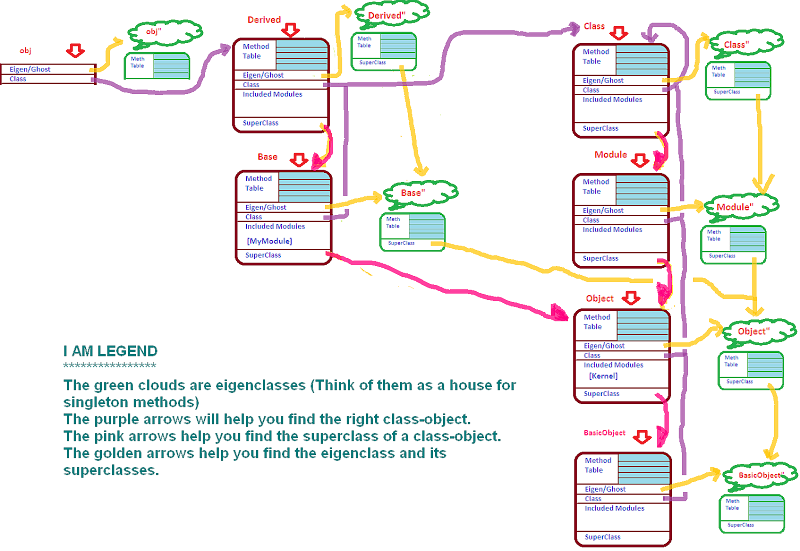
  • class methods are singleton methods of the class-object
  • a class-object is generally associated with a constant viz. it's class name.


So now let's get started. Don't let the following mouse-drawn picture scare you - it'll all make (some?) sense in sometime. In the meantime, right click on it and open it up in a new tab and have the picture handy for reference while you descend into this post.


Next jump right over this big puddle of source code. You can copy it into your editor if you want to try it out with me..

module Kernel
def breadcrumb
puts "Kernel#breadcrumb"
Module.nesting[0].instance_eval{ remove_method :breadcrumb }
end
end
class Object
def breadcrumb
puts "Object#breadcrumb"
Module.nesting[0].instance_eval{ remove_method :breadcrumb }
end
def self.breadcrumb
puts "Object.breadcrumb"
class << Module.nesting[0]
instance_eval { remove_method :breadcrumb }
end
end
end

module MyModule
def breadcrumb
puts "MyModule#breadcrumb"
Module.nesting[0].instance_eval{ remove_method :breadcrumb }
end

end

class Base
MY_CONST = :b
include MyModule

def breadcrumb
puts "Base#breadcrumb";
Base.class_eval{ remove_method :breadcrumb }
# Base.instance_eval{ remove_method :breadcrumb } UH-OH! why does this remove the inst method
end
def self.breadcrumb
puts "Base.breadcrumb"
class << Module.nesting[0]
instance_eval{ remove_method :breadcrumb}
end
end
end

class Derived < Base
def breadcrumb
puts "Derived#breadcrumb";
Module.nesting[0].instance_eval{ remove_method :breadcrumb }
end
def self.breadcrumb
puts "Derived.breadcrumb"
class << self
instance_eval{ remove_method :breadcrumb}
end
end
end

class Class
def breadcrumb
puts "Class#breadcrumb";
Class.class_eval{ remove_method :breadcrumb }
end
end
class Module
def breadcrumb
puts "Module#breadcrumb";
Module.class_eval{ remove_method :breadcrumb }
end
end


****LANDING ZONE****
Nice Jump!

I have defined a new class called 'Derived' which derives from 'Base' and includes 'MyModule'.
Unless a base type is explicitly specified, all classes derive from Object (which includes Kernel) (and derives from BasicObject - new in Ruby 1.9). e.g. Base derives from Object. This can be verified via


d = Derived.new
p d.class.ancestors # => [Derived, Base, MyModule, Object, Kernel, BasicObject]


Base and Derived each have defined a class method (self.breadcrumb) and an instance method (breadcrumb). MyModule just defines a module method of the same name.
Convention: Class/Singleton methods would print receiver.breadcrumb. Instance methods would print receiver#breadcrumb.

Take a deep breath and dive in...

First lets create a new instance of Derived and add a singleton method to it. (i.e. a method that is present only in that instance. Another instance of Derived would not have this method)
Here's how we do that...


d = Derived.new

class << d
def breadcrumb
puts "DerivedObj[id:%d].breadcrumb" % object_id
class << self
instance_eval{ remove_method :breadcrumb}
end
end
end


'Call once': once the method is called, the method disappears (is 'undefined'). This will help us uncover the order in Ruby tries to find a method. I have added such methods in all types up the hierarchy (and then some) to help us spot the trail.
(Note: Instance methods use class_eval to remove themselves. Singleton/class methods use instance_eval. Refer to the RPL book)

And now for the moment of truth


puts "Method call on an object".center(40, "*")
6.times{ d.breadcrumb }


Output:
********Method call on an object********
DerivedObj[id:6186928].breadcrumb
Derived#breadcrumb
Base#breadcrumb
MyModule#breadcrumb
Object#breadcrumb
Kernel#breadcrumb


Refer to the image (I was reading Why's Nobody know Shoes; which might explain some of the weird imagery and the helpfulness of it all ;) So here's what happened in the sequence illustrated by our 'call-once' breadcrumbs:

To the extreme left is our object d,
  • Call1: Find the eigenclass of d, look for a singleton method of that name. Found!
  • Call2: .. not found in eigenclass, find the class-object of d via the class attribute. Look in the methods defined in class Derived. Found!
  • Call3: .. not found in eigenclass/class. Look in included modules of D (most recently included one first).. there are none. Travel via the superclass portal to reach Base. Look for inst method. Found!
  • Call4: .. not found in eigen/class/incl module/superclass. Try included modules of superclass e.g. MyModule. Found!
  • Call5: .. not found in eigen/class-n-its-modules/superclass-n-its-modules. Go down the superclass portal again to reach Object. Look at instance methods. Found!
  • Call6: .. look in incl. modules of Object. Kernel. Found!


If you try calling the method again, Ruby would not be able to find a method of that name and would now try looking for a method_missing method (in the same manner as it tried looking for breadcrumb. However this time it is guaranteed to find it because Kernel has a method_missing implementation that raises the NoMethodError. Need to see it to believe it?


temp.rb:84:in `block in
': undefined method `breadcrumb' for # (NoMethodError)
from temp.rb:84:in `times'
from temp.rb:84:in `
'


So lets recap the steps.
1. Look in the eigenclass (golden arrow) for the class
2. If not found, traverse the class attribute (purple arrow) to find the class-object.
3. Look in the instance methods for this class
4. If not found, try included modules of the class (in reverse order of mixin)
5. If not found, check if we have a superclass (pink arrow). If yes, repeat steps 3-5 till we run out of superclasses
6. If still not found, go back to Step1 but this time look for a 'method_missing' method'


By the way, we just saw how instance methods are inherited. (Snuck that one on you.) If Derived doesn't define an instance method, all its ancestors are looked up in order ; inheritance works.

Take a break, have some lemonade before we set out again... Ready? Off we go again. This time instead of calling a method on an object, we call a class method. Comment the previous 2 lines...


puts "Method call on a class-object".center(40, "*")
7.times{ Derived.breadcrumb }


Output:
*****Method call on a class-object******
Derived.breadcrumb
Base.breadcrumb
Object.breadcrumb
Class#breadcrumb
Module#breadcrumb
Object#breadcrumb
Kernel#breadcrumb


Hey! we see some instance methods being invoked when we call a class method. What the... Deep breaths 1..2..3..pfffhoooo (u got to get the pfffhoooo right)

Let's see if our image can help us out, find the object pointed to by the constant Derived (3rd box from the left - first row)

  • Call1: Start at Derived. Follow the golden arrow to the Derived's eigenclass - Derived". Look for a singleton method. Found!
  • Call2: .. not found in eigenclass. But eigenclasses of class-objects have superclasses. Follow the golden arrow to Base's eigenclass. Found!
  • Call3: .. not found in Derived" or Base". But we still have a golden arrow to Object". Found!
  • Call4: .. not found in Derived"/Base"/Object".Try BasicObject" too. Not found. Now we're out of superclasses. Now we follow the purple arrow to the class-object of Derived i.e. Class. Look for instance methods defined there. Found!
  • Call5: .. not found in the eigenclass hierarchy or class-object. Try included modules in Class. not found. But wait, we have a superclass. Down the pink arrow to Module. Look for an instance method... found!
  • Call6: .. not found in eigenclass hierarchy/Class-n-included-modules/Module. Try included modules in Module. Nope. Down the pink arrow to Object. Found an instance method!
  • Call7: .. not found in eigenclass hierarchy/Class-n-incl-modules/Module-n-incl-modules/Object. Look in included modules of Object.. aha Kernel. Look for method.. found!


If you make one more call, you should now be guessing that a NoMethodError should show up from Kernel#method_missing(similar to the previous example)

So lets refactor the steps.
  1. Look for the method in the eigenclass (yellow arrow). Until we run out of superclasses for the eigenclass, inspect each eigenclass for the method.
  2. If not found, traverse the class attribute (purple arrow) to find the class-object.
  3. Look in the instance methods for this class
  4. If not found, try included modules of the class (in reverse order of mixin)
  5. If not found, check if we have a superclass (pink arrow). If yes, repeat steps 3-5 till we run out of superclasses
  6. If still not found, go back to Step1 but this time look for a 'method_missing' method

So the only new tidbits were
  • class methods are singleton methods of class-objects. They live in the green clouds tied with the yellow arrows to the class.
  • eigenclass of a class-object is special. These special 'green clouds' have superclasses.
And that is the secret behind class method inheritance... See the first three lines of the output. (Snuck another one.. {snicker} No more I promise.)

And that also explains how class method calls can result in instance methods being called. (Lines4-7)

And that's it folks! You will wake up enlightened or confused when I snap my fingers :)


As an exercise to people who like to stay and flex some meta-programming muscles. Try and explain this predicament.

Module defines a constants method, which returns the list of all known constants (incl. class names).
Module.constants => 102
Any user-defined class e.g. Base or Derived inherits this method ; however Base.constants returns only the constants defined inside Base (and its superclasses). e.g. If I add a constant inside Base.
Base.constants => 1
How does Module's constants behave differently in the Base (which inherits this functionality)?

Hint: Check Module.singleton_methods and Module.public instance_methods
Hint2: Hit Stackoverflow and search for the answer once you have taken a good crack at it.