Showing posts with label Continuous Integration. Show all posts

Show Me The Money - 2

Iteration Day 1/10
First step we need some version control and a CIS...
the book mentioned a project named DamageControl but that looks like it has closed shop for now. Some more surfing... CIA.. Cerebrus.. CruiseControl.rb aha!
I download the latest cruisecontrolrb-1.2.1.tgz, that along with the Getting Started page
was all that I needed.
I created a rails project on my machine with
  • l:\Gishu\Ruby>rails ShowMeTheMoney
then used Tortoise SVN to import the folder into the repository. You could also do it manually with
  • l:\Gishu\Ruby\ShowMeTheMoney> svn import -m "First Rails App into Version Control" svn://babybox/ShowMeTheMoney/trunk
Next I add a proj to cruisecontrol.rb with
  • D:\cruisecontrolrb-1.2.1>cruise add ShowMeTheMoney --url svn://babybox/ShowMeTheMoney/trunk
and start up the webrick server with
  • D:\cruisecontrolrb-1.2.1>cruise start
Yup that's what it says.. should work.. but didn’t. WWOOTB – won’t work out of the box.
Crazy gem of activesupport won't load.. seems like it wont load the gem version that comes along with cruisecontrol.rb.. Precious time is lost reinstalling various components, trying mailing lists and basically trying to beat the thing into submission.

[Many days later.. inertia is a leech]
And I make the mistake of waiting for cc.rb to be operational. Suddenly one day on my way back from work.. I have a pair of stunning revelations just like that
#1: There is nothing to build like in C#/Java
#2: I only need a CIS to run all the tests and inform me if someone breaks the build. Since I'm the only one working, I just have to watch myself.

I can proceed without cc.rb working right now. Now wiser and 1 day of our iteration time later, I trudge on to start ‘delivering value’.. we gotta start with that sometime soon if we want to be 'agile'.

[Alexey V. spent some time trying to get a handle on this thing.. ruby versions, gem versions, stack traces,... all in vain.]
Integrating NCover code coverage with your CCNet CIS

I managed to read one more chapter in the CIS story. This one is called ‘Integrating NCover with CruiseControl’.
The CruiseControl documentation page has most of the help you need.
CruiseControl.NET/Doc/CCNET/Using%20CruiseControl.NET%20with%20NCover.html
But NCover has always been a tricky one. If that page worked, I wouldn’t be writing this piece here.

Ingredients:


  1. A CruiseControl.Net (I use v1.0.1) build server running all green. And you better be TDDing that code too…J.

  2. NAnt I use this (v 0.85) to build my code.

  3. NCover I use version 1.3.3 since that’s the only one there that still works with VS2003. Pick up 1.5.x for VS 2005.


Once you have all that in place, it’s time to get this started. To run NCover we need to add a task to our build file. It differs from the one on the CCNet doc page in the placement of the quotation marks. I found my solution by watching the Nant Build log on the CCNet dashboard

<exec program="l:\tools\NCover\ncover.console.exe" commandline="/w AT_Bin\Debug /c &quot;L:\Program Files\NUnit_227\bin\nunit-console.exe&quot; TestBearings.dll" />


Save that one. Now move onto the ccnet.config file. Add this to the tasks block of your project element there. We need this so that code coverage report is merged to the Nant build output file.

<merge>
<files>
<file>L:\BuildFolder\AT_Bin\debug\Coverage.Xml</file>
</files>
</merge>


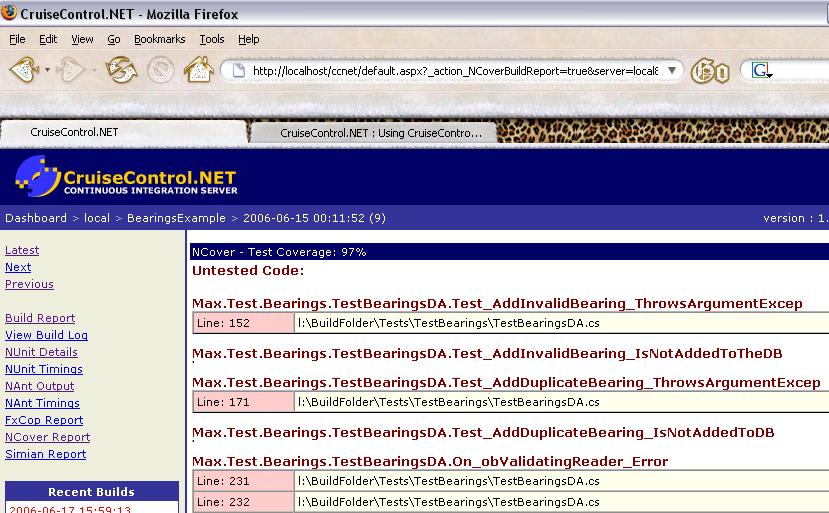
That’s it. Save and start a build. Hopefully that’s a green. Click on the green build link on the Recent Builds tab. Click on NCover report. You should be seeing something like this.


Now to find out why I don’t have 100% coverage J
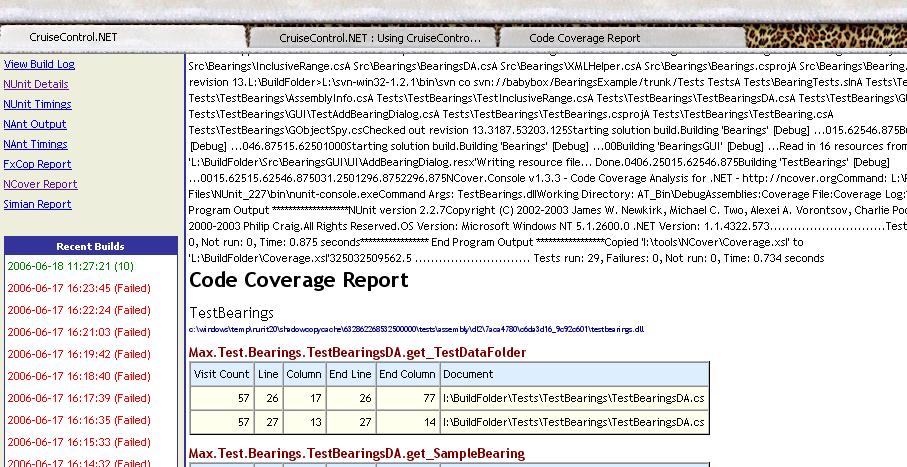
Just that you know it is possible, If you have a different stylesheet for NCover results, rename and replace the stylesheet named

CruiseControl.NET\server\xsl\NCover.xsl
with your own. Hit F5 to refresh your browser and you should see the new results. Here I have use the default xsl that comes with NCover – although the CCNet version is more to the point. The one I mentioned in my earlier post is the best. I got an unexpected console listing at the top … but no big deal.


Post Build events and NAnt build failures

Found a gotcha with NAnt and Visual Studio .NET 2003.
If you have specified a post-build event in the project properties (e.g. like a file copy operation - copy A.txt \executables) AND you have used the OutputDir attribute for the solution task in your NAnt build script (e.g. you want the built executables to go into another folder than the one specified in the proj properties) you'll run into build failures.


< solution configuration="${BuildConfig}" solutionfile="${ImportUtil_SlnPath}" outputDir="\executables" verbose="true">

The project will build correctly under the IDE but not under NAnt. This is because of the difference in current directories in both cases.


1. When run from the IDE, the path from which the postbuild batch is executed is [ProjectDir]\bin\debug (or release)
2. When run from NAnt, the path would be \executables (i.e. the OutputDir attribute value)
Hence the copy command can't find the source file and fails the build.

Lessons Learnt:

  • Post build events are not recommended - use NAnt build script as the single point where all such tasks are documented. Post build events are hidden inside property pages and hence are difficult for someone new to find out. This however means that the entire team makes a commitment to use Nant (bye bye IDE builds).
  • Do not use OutputDir attribute if you still use Pre/Post build events. :)

In the end I took option 2 to get my CI server back to Green

Building your own Continuous Integration Server

The benefits of setting up a CIS are just too obvious

Setting up a Continuous Integration Server This is more of a personal Note to myself than a tutorial. You will not leave this post feeling that you know all the tools. You will have to spend time with their docs and get a little frustrated at times, but hey you live you learn.. You will need the following things.

Step 1. This is easy. Ensure that you have a working build by opening the workspace/solution file in the IDE and doing a complete build. Now we use this as a base for Step 2.
Step 2:Making an NAnt build file. Please unzip and READ THE DOCS folder in the nant zip. I found the docs really cool - nothing that makes you read and read and read and zzz. You can keep skimming thru the docs when you hit a dead end. Find the solution and forge ahead. The core concept is simple. The build file has tasks like a batch file has commands. But the tasks are inherently more powerful and configurable or else they wouldn't exist. Take a print of the NAnt tasks list - quick reference at a glance. So here's what I came up with..

GC.build

G TIP

<?xml version="1.0"?>
<!-- NAnt build script for a VS.NET solution
Gishu Sep 14, 2005.
Email: gishu<dot>pillai<at>gmail<dot>com -->
<project name="GC" default="debugBuild">
<property name="ReleaseOutputDir" value="bin\release" />
<property name="SolutionFilePath" value="source\GC.sln" />
<target name="clean" description="Cleans binaries folder">
<delete dir="${OutputDir}" verbose="true" failonerror="false"/>
<mkdir dir="${OutputDir}" failonerror="false" />
</target>
<target name="debugBuild">
<property name="OutputDir" value="bin\debug" />
<property name="BuildConfig" value="Debug" />
<call target="clean" failonError="false"/>
<call target="build"/>
</target>
<target name="build">
<exec program="..\GC_CheckOut.bat" />
<echo message="Source Checkout complete" />
<solution configuration="${BuildConfig}" solutionfile="${SolutionFilePath}" verbose="true" > <assemblyfolders>
<includes name="C:\Windows\Microsoft.NET\Framework\v1.1.4322\**" fromPath="true" /> </assemblyfolders>
</solution> </target> </project>

  • The .NET solution has a pesky hintpath property for framework DLLs. Running the solution task looks up the hardcoded HintPath value and fails. To go around this, you need to add an AssemblyFolders element to the solution task, with the path to the Framework installation on the current machine. This can be a property/constant defined at the top of the build file.
  • Next, another thing that I overlooked in my exuberance is that NAnt.exe.config take framework 1.0 as the default. Change this is you are using Framework 1.1 or else meet Mr. Build Failure. When I found this, I felt specially stupid since I had done the same thing on my last attempt at home. This time I'm gonna DOCUMENT IT HERE!!!.
  • Use the new (and uber cool) solution task. It does not require the IDE and blah blah to be installed. What it does is that it parses the solution file and invokes csc ( long live the command line ) after resolving references. Now ain't that sweet ? It doesn't use devenv - less resources required and faster. I read this from DevX.

Step 3: Meet Cruise Control.NET CruiseControl is another Rad tool which will help complete our Continuous Integration Server. Configure your CruiseControl.NET Server: You need to make a ccnet.config file to make your server do something useful. Start with the \Doc\CCNET\CruiseControl.NET Server.html under the CC installed directory. You will need to write your specific sourcecontrol block, based on what you actually use. G TIP This tool will only detect an update to the SourceControl Server and then give you a callback. You have to write a script to check out the changes. CC won't do it for you. This was something I learned the hard way. So you need to write a script that will checkout the latest source. This will depend on exactly what you use - I have tried Subversion and StarTeam. Both would be different scripts - see their command line documentation for details. I have built myself a batch file. There I go putting my foot in my mouth. The Subversion block did not have this option but I now see that Starteam sourcecontrol block has a [autoGetSource]true[/autoGetSource] entry. I'll try that out later and update this post. For now I'll stick to my batch file (which I have verified works from the prompt).

Listing: Sample CC config file

<cruisecontrol>
<!-- My Second CruiseControl Config File
Gishu Sep 14, 2005.
Email: gishu<dot>pillai<at>gmail<dot>com -->
<project name="GC">
<sourcecontrol type="starteam">
<executable>c:\Program Files\Starbase\StarTeam 5.4\stcmd.exe</executable>
<project>GC.net/GC.net</project>

<username>buildGuy</username> <password>buildPwd</password>
<host>XX.XX.XX.XXX</host> <port>50000</port>
<path>/GC/Source</path>
<autoGetSource>false</autoGetSource>
</sourcecontrol>
<tasks>
<nant>
<baseDirectory>E:\GC\RootBuild</baseDirectory>
<buildFile>GC.build</buildFile>
<buildTimeoutSeconds>1200</buildTimeoutSeconds>
</nant> </tasks>
<triggers> <intervalTrigger seconds="1800" buildCondition="ForceBuild"/> </triggers> <publishers> <xmllogger><logDir>E:\Program Files\CruiseControl.NET\server\GCLogs</logDir></xmllogger> </publishers>
</project> </cruisecontrol>

Copy the ccnet.config file to your CruiseControl.Net\Server directory. Ensure that Nant is on your PATH EnvVar so that CC can find it. Now pray to your favourite God and double-click the ccnet.exe file in the server directory. This should start the CC Server. (SP2 might try to throw a spanner in the works. Click on Unblock).

G TIP

  • In case of people like me, this generally blows up. So what you do is start a command prompt and start the exe from within the command window. This gives you a chance to look at what blew up. Common things - incorrect paths, locked log files (Stop any running servers first), etc.Ok looks like I got my StarTeam folder project and view names wrong. Backspace Backspace Type Type. That’s it !

Now I can open my web dashboard http://localhost/ccnet to view a whole lot of things on a web page, totally FREE. Not an iota of effort put in. That’s the kinda of thing I like. I had a lotta fun doing this and this will help me have a lot of fun in the future rather than sit here verifying builds. I have got better things to do.. If you have any issues/suggestions or things that you feel I should know, post a comment here. I’ll try my best to get back.. Ciao!

KILLJOY FootNote

Source control servers across WANs rob you of most of the joy with a CIS. E.g. My experiment showed that a project which takes around 17 secs to build from the command prompt with an NAnt script, will take ~11 mins! What the @#%^!!! Allmost all the time is spent in network operations for the SourceControl app (Starteam here), even when checking out only the changes. Still I feel that the benefits justify the time spent even though you have to wait for some time to see the green light. Another excuse for a break :)

Update
Starteam is absolutely horrendous. If you have ST as the source control and it is also across a WAN, please stick with doing all this manually. Take this from me..